Prolific Submission Guide

Introduction
This page contains information about how to complete your submission on prolific. Make sure you have the tracer installed and running before you continue reading the following page.
We'll provide a code that you can submit to prolific to complete the experiment. The code will be provided to you after you have uploaded AT LEAST 1 trace file.
⚠️ PLEASE NOTE if you submit without using the submission code, we'll MESSAGE you to RETURN your submission.
If we didn't receive your response WITHIN 24 HOURS, we'll REJECT your submission.
How to get your submission code
Windows
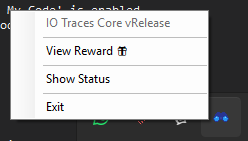
- Right click the tray icon of IO-Tracer.
- Click "View Reward".
- A dialogue will popup, displaying your Prolific submission code.
The program will notify you once you've passed the reward threshold, or you can check regularly by following the steps above.
Linux
The Linux experience is straightforward: you'll be notified directly in the CLI once you're eligible.
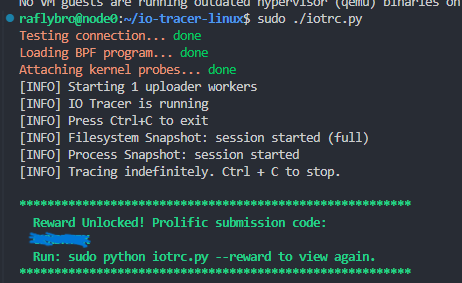
If you happen to miss the notification, you can check your reward status anytime with:
sudo ./iotrc.py --reward